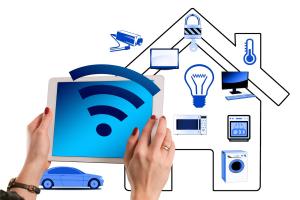
Home automation is like giving your house a brain. It allows you to control various devices in your home – from lights to security cameras – all from your phone or voice. If you’re new to this techy world, don't worry! We're here to guide you through the basics.
At its core, home automation relies on several key components: smart devices, a hub, and often, a reliable Wi-Fi network. Smart devices can include anything from smart bulbs and thermostats to security systems. These devices communicate with each other and can often be managed through a central hub or app, making it simple to keep everything organized.
One of the best things about home automation is that you can start small. Maybe try smart light bulbs first. They let you control your lighting remotely and can even change colors! Once you’re comfortable, you can move on to other gadgets, like smart locks or cameras, depending on what you feel your home needs.
Don’t forget about compatibility! Not every smart gadget works well with others, so it’s important to check if they can all play nicely together. Popular platforms like Google Assistant, Amazon Alexa, and Apple HomeKit often have lists of compatible products that can help make your decisions easier.
Lastly, consider your lifestyle. Do you travel a lot? Home automation can help with security by allowing you to set timers for lights or even getting alerts about unusual activity. Think about what would make your life easier or more comfortable, and let that guide your choices as you explore the exciting world of home automation!
Choose Smart Devices for Your Home
When it comes to smart devices for your home, the options can feel overwhelming. But choosing the right ones can really make your life easier and your home smarter. Start by figuring out which areas in your home you'd like to automate. Do you want to control the lights, the thermostat, or maybe even your security system? Narrowing down your focus will make the decision process smoother.
Next, think about compatibility. You’ll want devices that can work together seamlessly. If you have a specific voice assistant in mind, like Alexa, Google Assistant, or Apple HomeKit, check if the devices you’re considering are compatible. This way, you can control everything with just your voice or a single app, making your home feel even more connected.
Don’t forget about ease of use! Look for devices that are user-friendly and come with easy-to-follow instructions. The last thing you want is to spend hours figuring out how to set things up. Read reviews and product descriptions to see how other users have experienced setup and everyday use.
Finally, stick to your budget. Smart home tech can vary from budget-friendly options to high-end devices. Decide what features are most important to you and don’t feel pressured to buy everything at once. Start with a few essentials and expand your setup as you go. Home automation should be fun and suit your lifestyle!
Set Up Your First Automation System
Getting started with your first automation system can feel a bit overwhelming, but it doesn’t have to be! The key is to break it down into easy steps. First, think about the areas in your home that could use a little tech magic. Do you want to control your lights, manage your thermostat, or keep an eye on security? Pinpointing your priorities makes it easier to choose the right devices.
Next, you’ll want to pick a hub or platform that connects everything. Popular options include Google Home, Amazon Alexa, or Apple HomeKit. Each has its unique features, so consider what fits best with your lifestyle. If you already have smart devices, check that they’re compatible with the hub you choose!
Remember, you can always expand as you go! Testing out different combinations and routines can be a fun way to make your home more comfortable and efficient. Don't hesitate to tweak things until it feels just right for you!
Tips for Troubleshooting Common Issues
Starting your home automation journey can be a thrilling experience, but sometimes things don’t go as planned. Here are some simple tips to help you troubleshoot common issues you might face.
1. Connectivity Problems
2. Device Not Responding
3. Voice Assistant Issues